Filesystem as agent memory: progress file, feature list and git log in practice
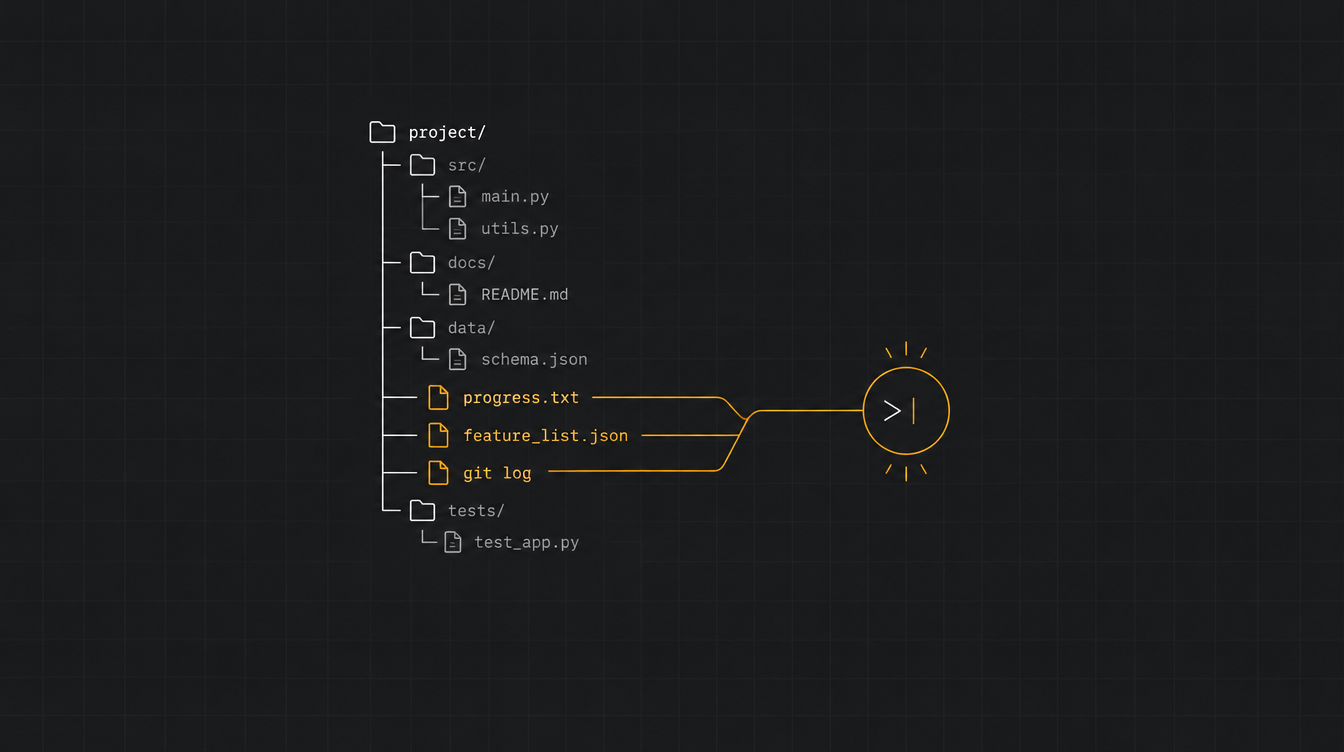
Using the filesystem as agent memory means pulling task state out of the context window and into files the agent reads and writes itself: a progress file, a feature list in JSON, the git history. The window becomes short-term memory. The disk becomes the memory that survives.
Sounds small. It isn't.
Every agent that runs across more than one context window hits the same wall: the new session starts with no memory of the last one. Anthropic describes it as a software project staffed by engineers working in shifts, where each new engineer arrives with no idea what the previous shift did.
In this tutorial you'll build, in PHP, the four pieces that fix this: the progress file, the JSON feature list, the session start ritual, and offloading large tool results to disk.
TL;DR
- What it is: a harness pattern where agent state lives in files (progress, plan, large results), not in the conversation.
- Stack: any agent loop with read file, write file and shell tools. Examples in PHP 8.3 / Laravel.
- Cost/Access: zero new infrastructure. It's disk, JSON and git.
- Main reference: Effective harnesses for long-running agents, by Anthropic.
Why the context window doesn't work as memory
A bigger window doesn't solve it. It just postpones the problem.
Anthropic's context engineering post is blunt: windows of every size suffer from context pollution and information relevance problems. For long tasks they list three techniques: compaction, structured note-taking (the agent writes notes outside the window and reads them back later), and subagents.
Compaction alone doesn't hold. In the long-running agent experiment, Anthropic ran Claude on the Agent SDK, with compaction on, asking it to build a claude.ai clone. Two failures showed up:
- The agent tried to do everything at once. It ran out of context in the middle of a feature, and the next session inherited half-written, undocumented code.
- The agent declared victory early. A later session looked around, saw that a lot already existed, and called the project done.
Manus reached the same conclusion from a different direction. In Manus's context engineering post, the filesystem is treated as "the ultimate context": unlimited in size, persistent by nature, and directly operable by the agent itself.
The part people usually miss: this isn't just storage. The agent decides what to write, when to reread and what to drop from the window. It's memory managed by the model itself.
If you want to see this pattern built in front of you, with the agent losing its session and getting back to work by reading its own files, it's one of the hands-on blocks of AI Engineering Lab 4ª Edição, a live Harness Engineering immersion on November 14 and 15, 9am to 1pm (Brasília time).
Filesystem as agent memory: the four pieces
Before the code, the map:
| Piece | File | Job |
|---|---|---|
| Progress log | progress.md |
what was done, what broke, what comes next |
| Feature list | feature_list.json |
the full scope, with a passes status per item |
| History | git log |
what actually changed, and a safe point to roll back to |
| Large results | .agent/tool_results/*.txt |
tool output that doesn't fit in the window |
The first three come straight from Anthropic's harness. The fourth is what Manus calls restorable compression, and what LangChain's Deep Agents does automatically under /large_tool_results/.
Prerequisites
- [ ] An agent loop you control. If you don't have one yet, start with the first harness in Laravel.
- [ ] Read file, write file and shell tools exposed to the model.
- [ ] Git in the agent's working directory.
- [ ] PHP 8.3+.
A tutorial shows you the way — in the Clã you build alongside us. A live class every week, real AI Engineering projects, next to people already in production.
Join the ClãHands-on: agent memory on disk, step by step
Step 1: the JSON feature list
The first problem is the agent that thinks it's done. Anthropic's fix: an initial session (the "initializer agent") expands the user's request into an exhaustive list of features. For the claude.ai clone that meant over 200 items, all starting as failing.
The format they published:
{
  "category": "functional",
  "description": "New chat button creates a fresh conversation",
  "steps": [
    "Navigate to main interface",
    "Click the 'New Chat' button",
    "Verify a new conversation is created",
    "Check that chat area shows welcome state",
    "Verify conversation appears in sidebar"
  ],
  "passes": false
}
The detail that matters: they picked JSON over Markdown because the model is less likely to inappropriately rewrite or overwrite a JSON file. And the prompt forbids editing anything except the passes field.
Forbidding it in the prompt is good. Enforcing it in the harness is better. This guard runs after every agent write and rejects any change that isn't to passes:
<?php

namespace App\Agent\Memory;

use RuntimeException;

final class FeatureListGuard
{
    /**
     * Compares the previous version with the new one and only accepts changes to "passes".
     */
    public function assertOnlyStatusChanged(string $before, string $after): void
    {
        $old = json_decode($before, true, flags: JSON_THROW_ON_ERROR);
        $new = json_decode($after, true, flags: JSON_THROW_ON_ERROR);

        if (count($old) !== count($new)) {
            throw new RuntimeException('Agent added or removed features. Rejected.');
        }

        foreach ($old as $i => $feature) {
            $strip = fn (array $f) => array_diff_key($f, ['passes' => true]);

            if ($strip($feature) !== $strip($new[$i])) {
                throw new RuntimeException("Feature #{$i} was edited beyond its status. Rejected.");
            }
        }
    }
}
The agent can set passes: true. It can't delete the annoying test that won't pass. That's the difference between a rule in the prompt and a rule in code.
Step 2: the progress log
The second file is the log. In Anthropic's experiment it's called claude-progress.txt, and together with git it's what lets a fresh session quickly understand the state of the work.
The format is free, but structure helps the next shift read fast:
# progress.md

## Session 2026-11-06 10:42
- Feature worked on: #14 "User renames conversation"
- Status: passes end-to-end test
- Commit: 3f9c2a1
- Note: the rename modal uses a native alert, browser test can't see it

## Suggested next step
- Feature #15 "User deletes conversation"
- First: run ./init.sh and the smoke test, the build broke twice today
The end-of-session rule comes with it: one descriptive commit and one log entry. Anthropic reports this let the agent use git to revert bad changes and recover working states.
Step 3: the session start ritual
With the files in place, every new session starts the same way. Anthropic's list is almost embarrassingly simple:
pwdto know where it is.- Read the git log and the progress file.
- Read the feature list and pick one feature, the highest-priority one that doesn't pass yet.
- Run
init.sh, start the server and run a basic test before touching anything.
Step 4 matters more than it looks. If the previous session left the app broken, starting a new feature only makes it worse.
You can let the model do this on its own via the prompt, or do the work in the harness and hand over a ready summary in the first message:
<?php

namespace App\Agent\Memory;

use Illuminate\Support\Facades\Process;

final class SessionBootstrap
{
    public function __construct(private string $workdir) {}

    public function briefing(): string
    {
        $progress = $this->tail("{$this->workdir}/progress.md", 60);
        $gitLog   = Process::path($this->workdir)->run('git log --oneline -20')->output();
        $features = json_decode(file_get_contents("{$this->workdir}/feature_list.json"), true);

        $pending = array_filter($features, fn ($f) => $f['passes'] === false);
        $next    = array_key_first($pending);
        $total   = count($features);
        $done    = $total - count($pending);

        return <<<TXT
        You are resuming work in progress. Do not start from scratch.

        Progress: {$done}/{$total} features passing.
        Next feature (#{$next}): {$features[$next]['description']}

        Recent commits:
        {$gitLog}

        Recent log:
        {$progress}

        Before implementing: run ./init.sh and the smoke test. If something is broken, fix it first.
        Work on ONE feature. When done: descriptive commit and a new entry in progress.md.
        TXT;
    }

    private function tail(string $path, int $lines): string
    {
        return implode("\n", array_slice(file($path, FILE_IGNORE_NEW_LINES), -$lines));
    }
}
Look at what this does to cost. The agent doesn't spend ten tool calls figuring out where it stopped. It spends zero.
Step 4: offloading large tool results to disk
The fourth piece is the one that saves the most tokens day to day. A tool that returns a web page, a PDF, a CI log or a big query result fills the window in two calls.
Manus states the rule: compression has to be restorable. A page's content can leave the context as long as the URL stays. A document's content can leave as long as its file path stays.
In practice, a middleware in your loop:
<?php

namespace App\Agent\Memory;

use Illuminate\Support\Str;

final class ToolResultOffloader
{
    public function __construct(
        private string $dir,
        private int $maxChars = 8_000,
    ) {}

    public function handle(string $toolName, string $output): string
    {
        if (mb_strlen($output) <= $this->maxChars) {
            return $output;
        }

        $path = sprintf('%s/%s-%s.txt', $this->dir, $toolName, Str::ulid());
        file_put_contents($path, $output);

        $preview = mb_substr($output, 0, 1_500);
        $lines   = substr_count($output, "\n") + 1;

        return <<<TXT
        [large result saved to {$path} ({$lines} lines)]
        Preview:
        {$preview}
        ...
        Use read_file with offset/limit or grep on that path to read the rest.
        TXT;
    }
}
The model gets a preview and a pointer. If it needs the rest, it reads in chunks. It's the same behavior Anthropic describes in Claude Code: store the result, use head and tail, and never load the whole object into the window.
Virtual memory or a real sandbox?
Here's an architecture decision a lot of people skip. Not every agent file needs to live on a real disk.
Deep Agents splits this into backends. StateBackend is ephemeral, works as a scratch pad and receives the automatic eviction of large results. FilesystemBackend writes to real disk. And the docs themselves recommend a CompositeBackend so plans, notes and evicted results don't get mixed with project files.
The split I use:
- Plans, notes and large results: cheap harness storage (an
.agent/directory, a database table, an object in storage). No sandbox needed. - Code the agent executes: a real, isolated sandbox. Only here.
- Feature list and log for code projects: inside the repository, versioned in git alongside the code.
Putting everything in one container works in the demo. In production, when the container dies, the state dies with it.
Limitations and gotchas
- Memory files are attack surface too. Content from a web page that ends up in
progress.mdcomes back into context every session. That's persistent prompt injection. Treat outside content as data, not instructions, and review what the agent writes. - The log rots. Without a size rule,
progress.mdturns into a 3,000-line file nobody reads. Read only the tail (like the example) and have the agent summarize old entries from time to time. - The agent setting
passes: truewithout testing. Anthropic saw this happen: code changed, unit test run, feature marked done and broken end to end. The file doesn't solve verification. It only makes the lie auditable. - Concurrent writes. Two subagents writing to the same
feature_list.jsonis a guaranteed race. One owner per file, or a lock. - Sensitive data on disk. A tool result with customer data now lives in a file. Apply the same retention policy you apply to logs.
FAQ
Does this replace vector memory?
No. It solves a different problem. Vector memory is for remembering user facts across different conversations. File memory is for keeping the state of one task that spans several context windows. For the first one, see how to give your agent real memory.
Why JSON and not Markdown for the feature list?
Because in Anthropic's tests the model was less likely to inappropriately rewrite or overwrite a JSON file than a Markdown one. And JSON can be validated in code, like the guard in step 1. Markdown works well for the log, which is free text meant to be read.
Do I need an agent framework to use this pattern?
No. It's files, a git log and a handful of lines in your loop. Frameworks like Deep Agents ship the offloading ready-made, but the pattern works in any harness that exposes read file, write file and shell to the model.
Does it work outside coding agents?
Anthropic shows Claude playing Pokémon with its own notes: after each context reset, it rereads the notes and keeps going with hours-long training sequences. Research, data migration and long analysis follow the same logic.
Conclusion
The context window is working memory. It's expensive, finite and degrades as it fills up. The filesystem is everything else: cheap, persistent and auditable.
The whole pattern fits in four pieces: a JSON feature list that only accepts status changes, a progress log, a session start ritual, and offloading large results with a restorable pointer. None of them needs new infrastructure.
The natural next step is the uncomfortable question: who guarantees that passes: true is true? When the agent marks its own task as done, you need verification that doesn't depend on the agent. Meanwhile, if your harness still carries too many rules in the prompt, read why newer models need fewer rules and understand why Claude Code stalls on long tasks.

{AI Engineer} — apaixonado por Laravel, arquitetura de software e construir produtos com impacto. Compartilho aqui tutoriais, descobertas e reflexões sobre o dia a dia de engenharia.
There is no shortage of content. What is missing is someone to untangle it: what matters now is how to implement it the right way. In the Clã you get that live, every week, with people who have already filtered out the noise.
Join the Clã