Code Mode MCP: why your agent should write code instead of calling tools
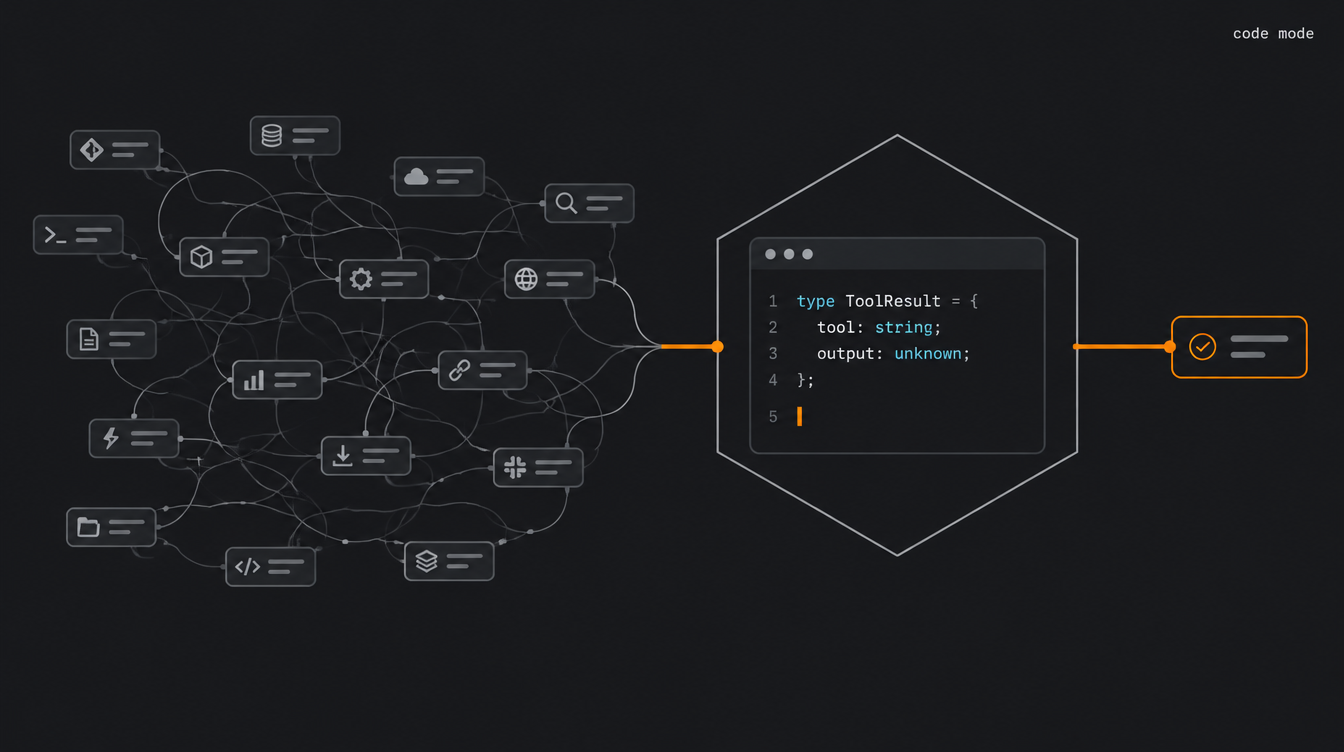
Code Mode MCP is the pattern where the agent writes TypeScript code that calls MCP tools, instead of making one tool call at a time. The code runs in a sandbox and only the final result goes back to the model.
Sounds like a detail. It isn't.
You plug six MCP servers into your agent. GitHub, database, Slack, Drive, CRM, deploy.
Before it reads the user's first question, it has already burned tens of thousands of tokens on tool descriptions alone.
And once it starts working, every tool result flows through the whole model, just to get copied into the next call's arguments.
Code Mode MCP is the answer to that waste. The idea, published by Cloudflare and explored in parallel by Anthropic, is simple: instead of exposing MCP tools directly to the model, you convert them into a TypeScript API and ask the model to write code that calls that API. The code runs in a sandbox. Only the final result goes back into context.
In this post you'll see why it works, how Cloudflare built it under the hood, how to plug their MCP server into your agent, and where the pattern bites you.
TL;DR
- What it is: a pattern where the agent writes TypeScript that calls MCP, instead of making tool call after tool call.
- Stack/Models: Cloudflare Agents SDK (
@cloudflare/codemode), Worker Loader (Dynamic Workers), V8 isolates. Works with any model that writes decent code. - Cost/Access: open-source SDK in the cloudflare/agents repo. Worker Loader in production started as a closed beta. Cloudflare's MCP server at
https://mcp.cloudflare.com/mcpis open to anyone with an account. - Numbers: Cloudflare measured 1.17 million down to about 1,000 input tokens (99.9%) on its own API MCP. Anthropic, in one example, went from 150k to 2k tokens (98.7%).
- Useful link: Code Mode: the better way to use MCP
Code Mode MCP: the two taxes of tool calling
Traditional tool calling charges two taxes. Anthropic describes both bluntly.
First tax: tool definitions eat context. Most MCP clients load every definition up front. An agent with thousands of tools may process hundreds of thousands of tokens before reading the request.
Second tax: intermediate results flow through the model. In Anthropic's example, copying a 2-hour meeting transcript from Google Drive to Salesforce pushes the full text through the model twice. That's about 50k extra tokens, just for "copy from here, paste there".
Now the interesting part. Why does code fix this?
Cloudflare's argument, in the post by Kenton Varda and Sunil Pai, is about training. LLMs have seen an absurd amount of real TypeScript. Tool calls, they've seen little of, and almost all of it synthetic, built for fine-tuning. Their analogy: asking a model for tool calls is like asking Shakespeare to write a play in Mandarin after a month of classes.
Then there's chaining. With tool calls, every output goes back to the model, which decides the next call and copies the data over. With code, the model writes the chain once, the sandbox runs it, and only the final console.log() comes back.
The numbers came later. Cloudflare applied the pattern to the MCP for its own API, which has over 2,500 endpoints. A conventional MCP server for that would cost 1.17 million input tokens, measured with tiktoken. With Code Mode, the server takes about 1,000 fixed tokens, no matter how many endpoints exist. Anthropic reported 150k dropping to 2k tokens on the Drive → Salesforce flow.
This isn't a prompt trick. It's an architecture decision: what the model sees, what stays in the sandbox, where the credential lives. That kind of decision, with real agents running and no slides, is what we break down every week, live, in the Beer and Code Clan.
How Code Mode works under the hood
Four pieces. Each one solves a specific problem.
1. MCP schema becomes a TypeScript API. When you connect a server in code mode, the Agents SDK fetches the server's schema and generates TypeScript interfaces and function declarations, with doc comments. That's what the model reads.
2. The agent sees a single tool. Instead of 40 tools, it sees one: "run this TypeScript". The code runs in the sandbox and console.log() output comes back when the script finishes.
3. Disposable isolate, not a container. The code runs in a V8 isolate, created on demand by the Worker Loader API. An isolate starts in a few milliseconds with a few megabytes of memory. Cheap enough to create one per snippet and throw it away, no pooling, no prewarming.
4. Bindings instead of network. Here's the security insight. The sandbox has no internet: global fetch() and connect() throw errors. Access to each MCP server goes through a binding, a live object in env. And the binding comes pre-authorized: the call goes through the agent supervisor, which holds the token and injects it into the request. Model-generated code never sees the API key.
As a diagram:
TOOL CALLING TRADICIONAL
usuário → modelo → tool A → [resultado inteiro no contexto]
               → modelo → tool B → [resultado inteiro no contexto]
               → modelo → tool C → resposta
(N idas e voltas, todo dado intermediário passa pelo modelo)

CODE MODE
usuário → modelo → escreve script TS
               → isolate executa: A → filtra → B → C
               → console.log(resumo) → modelo → resposta
(1 ida e volta, dado intermediário fica no sandbox)
A tutorial shows you the way — in the Clã you build alongside us. A live class every week, real AI Engineering projects, next to people already in production.
Join the ClãHands-on: Code Mode in practice
Three paths, from most ready-made to most manual.
Step 1: plug in Cloudflare's MCP (Code Mode built in)
The fastest way to feel the pattern is Cloudflare's MCP server, released in February 2026. It exposes the entire API through two tools, search() and execute(). In Claude Code, Cursor or any MCP client:
{
  "mcpServers": {
    "cloudflare-api": {
      "url": "https://mcp.cloudflare.com/mcp"
    }
  }
}
On connect, you get redirected to Cloudflare to authorize and pick permissions. The token is downscoped to what you approved. For CI/CD, use an API token as a bearer in the Authorization header.
The agent flow looks like this: first it runs a search() against the OpenAPI spec (which never enters the context), something like:
async () => {
  const results = [];
  for (const [path, methods] of Object.entries(spec.paths)) {
    if (path.includes("/zones/") && path.includes("rulesets")) {
      for (const [method, op] of Object.entries(methods)) {
        results.push({ method: method.toUpperCase(), path, summary: op.summary });
      }
    }
  }
  return results;
}
Then an execute() that calls cloudflare.request(), handles pagination and chains operations in a single run. In the post's example, setting up DDoS and WAF protection for a zone took four tool calls total.
Step 2: Code Mode in your own agent
If you have an AI SDK agent and want the same effect with your own tools, the package is @cloudflare/codemode. Per the API reference, you create an executor on top of Worker Loader and wrap your tools into a single code tool:
import { DynamicWorkerExecutor } from "@cloudflare/codemode";
import { createCodeTool } from "@cloudflare/codemode/ai";

const executor = new DynamicWorkerExecutor({
  loader: env.LOADER,     // Worker Loader binding
  timeout: 60000,
  globalOutbound: null,   // no network: bindings only
});

const codeTool = createCodeTool({
  tools: myAiSdkTools,    // your current AI SDK tools
  executor,
});
And in wrangler.jsonc, the loader binding:
{
  "worker_loaders": [{ "binding": "LOADER" }]
}
Already have an MCP server and just want to wrap it? There's codeMcpServer() in @cloudflare/codemode/mcp, which takes the original McpServer and returns a new one with a single code tool.
Pro tip: globalOutbound: null is the default, and it's what guarantees generated code can't make requests anywhere beyond the bindings. Don't change it for convenience.
Step 3: Anthropic's variant, a filesystem of tools
Anthropic got to the same place by another road. Instead of loading the full TypeScript API, each MCP server becomes a file tree: ./servers/google-drive/getDocument.ts, and so on. The agent lists directories, reads only what it needs, and writes the code:
const rows = await gdrive.getSheet({ sheetId: 'abc123' });
const pending = rows.filter(r => r.Status === 'pending');
console.log(pending.length, pending.slice(0, 5));
A 10,000-row sheet, and the model sees five. That's progressive disclosure: tools loaded on demand, not all at once.
Two bonuses worth the post. First, privacy: intermediate data stays in the sandbox, and the MCP client can tokenize PII (swap emails for placeholders) before anything reaches the model. Second, reuse: the agent can save working code as a function and drop a SKILL.md next to it. If you already use skills in Claude Code, you know the pattern.
Common error across all three paths: the model writes code that doesn't run. Wrong type, missing field, promise without await. The loop is the usual one: the error goes back to the model and it fixes it. The difference is that doc comments generated from the schema prevent half of those errors. A poorly described MCP schema becomes poorly written code.
Limitations and gotchas
Code Mode is not a free lunch.
- You need a real sandbox. Anthropic itself warns: running generated code requires isolation, resource limits and monitoring. That's operational overhead direct tool calls don't have. On Cloudflare it comes built in. On your server, it's your problem.
- The numbers come from the vendors. 99.9% and 98.7% are Cloudflare's and Anthropic's measurements, in scenarios they picked, with lots of tools and lots of intermediate data. Anthropic's 98.7% is an example flow, not a general benchmark. The gain depends on definition size, response volume and call-chain length. An agent with three tools and short responses gains much less. Measure your own case.
- Cloudflare's original post has no benchmark at all. The quality claims are qualitative. The measured gain came later, and it's about tokens, not accuracy.
- Prompt injection doesn't go away. The sandbox keeps the key from leaking, but the code can still do things you didn't want, with the permissions you granted. Token downscoping and human approval for destructive operations are still mandatory.
createCodeTool()even excludes tools flagged withneedsApproval: durable approval needs a different flow. - Debugging changes. Instead of reading a sequence of tool calls, you read a script. Logging what ran in the sandbox is mandatory.
If you're taking MCP to production, the OAuth, schema and gateway checklist still applies underneath all of this.
Quick FAQ
Does Code Mode replace MCP? No. MCP is still the contract: schema, auth, discovery. Code Mode only changes the interface between the model and that contract. Instead of the model calling a tool, it writes code that calls the tool. The MCP server doesn't change at all.
Does it work outside Cloudflare?
The pattern does. Anthropic describes the same idea without tying it to a provider, and any secure sandbox works (container, Firecracker, Deno with locked-down permissions). It's the @cloudflare/codemode SDK that depends on Worker Loader. Locally, it runs with Wrangler and workerd.
Which model works best? Any model that writes TypeScript well. The whole thesis is that models are better at code than at tool calls. Smaller models gain proportionally more, because they fumble the tool-call format more often.
What about my Laravel app? The agent can live in PHP and delegate only execution to a Worker running Code Mode, or you build your own sandbox. What matters is the idea: the model doesn't need to see intermediate data. That holds in any stack.
Conclusion
Code Mode is a small interface change with a big effect. The model stops being a JSON router and goes back to doing what it saw most in training: writing code. MCP stays the contract. The sandbox becomes where the heavy data lives.
The next step is already sketched: Cloudflare wants first-class Code Mode for any MCP server via MCP Server Portals, with a fixed token footprint no matter how many services sit behind the gateway.
If you're still building the foundation, start with what MCP is and then build an MCP server from scratch. Then come back here and wrap it in Code Mode.

{AI Engineer} — apaixonado por Laravel, arquitetura de software e construir produtos com impacto. Compartilho aqui tutoriais, descobertas e reflexões sobre o dia a dia de engenharia.
There is no shortage of content. What is missing is someone to untangle it: what matters now is how to implement it the right way. In the Clã you get that live, every week, with people who have already filtered out the noise.
Join the Clã