Does Muse Glimmer 30B Really Fit on an RTX 3090? Meta Says One Thing, the People Who Tested It Say Another
The fight started about six hours after the announcement.
On one side, the press: Meta Superintelligence Labs released Muse Glimmer, 30 billion parameters, open weights under Apache 2.0, and yet "you're going to need a powerful PC." On the other, r/LocalLLaMA posting nvidia-smi screenshots: running on a used RTX 3090 from 2020, with 130k tokens of context and VRAM to spare.
Both can't be right at the same time. Except they are.
In this post I settle the contradiction with the only things that matter when it comes to local models: the VRAM budget line by line, the KV cache math that explains Meta's engineering trick, and an honest tokens-per-second estimate on a 3090, with the math shown so you can check it yourself.
TL;DR
- What it is: Muse Glimmer 30B, a dense model from Meta Superintelligence Labs with a 1.8B perception encoder, optimized for local agent workflows.
- License: Apache 2.0. Commercial use allowed, no monthly active users clause.
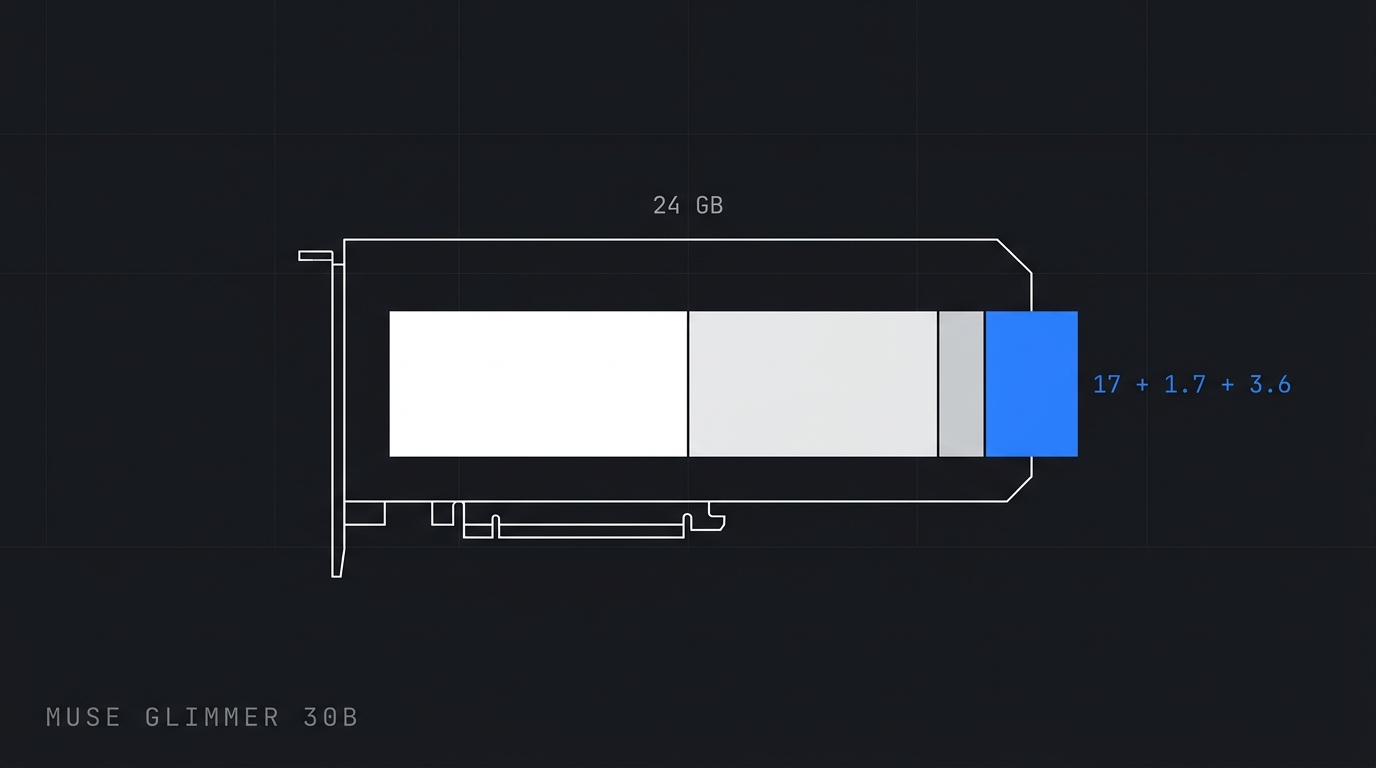
- Does it fit on a 3090? Yes. The 4-bit language model takes ~17 GB and the KV cache for 131k tokens costs ~1.7 GB. There's headroom in 24 GB.
- Where the press is right: if you want the model + vision + the speculative decoding drafter all loaded at the same time, 24 GB doesn't cut it.
- Stack:
ollama run muse-glimmeror the Unsloth GGUF on llama.cpp. - Official: research.meta.ai and developer.meta.com.
The context: why this turned into a VRAM fight
Meta's official announcement is careful. It says the model is "small enough to run on a Mac or PC with a single consumer GPU" and that 4-bit quantization puts the language model "under 20 GB," fitting in a "24 GB or 32 GB envelope."
Note the plural. There are two envelopes, and Meta published two different checkpoints for them:
| Checkpoint | Target | Degradation |
|---|---|---|
| BF16 (full precision) | 64 GB of VRAM | baseline |
| K-Quant-Dynamic | 32 GB | 0.2% |
| K-Quant-17GB | 24 GB | 1.0% |
Source: model card on Hugging Face.
The press grabbed the top row and Reddit grabbed the bottom one. Notebookcheck summed it up like this: "you need 24 GB of video memory, so an RTX 5090, an RTX 4090 or a Mac with an M4 Max." Notice what got left off that list. The RTX 3090 also has 24 GB. It just doesn't show up on any vendor blog, because no vendor has any interest in benchmarking a card from 2020.
NVIDIA's blog did worse: the official page highlights the 32 GB RTX 5090 as "the consumer option" and drops the throughput number from a datacenter Blackwell Ultra in the middle of the text. It's new-card marketing using an open model as bait.
And here's the point that separates people who read releases from people who ship things to production: the number that decides whether it fits on your card isn't the model size. It's the sum of four things competing for the same VRAM. If you want to apply this kind of math to a real product, alongside other devs doing the same thing, that's the conversation happening inside Beer And Code.
Let's do the sum.
The VRAM math nobody did
A dense 30B model runs as four pieces in memory: the language model weights, the KV cache, the perception encoder (if you want image input), and the speculative decoding drafter (if you want speed).
The weights
Unsloth published the GGUF table on launch day:
| Quantization | VRAM |
|---|---|
| UD-Q2_K_XL | 12 to 14 GB |
| UD-Q3_K_XL | 14 to 15 GB |
| UD-Q4_K_XL | 17 GB |
| UD-Q6_K_XL | 20 to 22 GB |
| UD-Q8_K_XL | 34 GB |
| BF16 | 58 GB |
On a 3090, the target is UD-Q4_K_XL: 17 GB. That leaves 7 GB.
The KV cache (this is the trick)
This is the part all the coverage ignored, and it's where the real engineering lives.
The model card gives away the architecture: 52 layers, grouped-query attention with 32 query heads to 2 KV heads, head dimension 128, and a repeating [Local, Local, Local, Global] attention pattern, with a 2048-token sliding window on the local layers.
Translating that into bytes. Each token, at each layer, stores a key and a value:
2 (K e V) × 2 KV heads × 128 dims × 2 bytes (fp16) = 1.024 bytes = 1 KiB por camada
Of the 52 layers, only 1 in 4 is global. That's 13 global layers that hold the entire context and 39 local ones that only hold the last 2048 tokens.
Globais:  13 camadas × 1 KiB × 131.072 tokens = 1,63 GiB
Locais:   39 camadas × 1 KiB ×   2.048 tokens = 0,08 GiB
------------------------------------------------------
KV cache a 131k de contexto:                    ~1,7 GiB
A KV cache of 1.7 GB for 131k tokens on a 30B model. To give you a sense of scale: if all 52 layers were global with that same GQA, it would come to 6.5 GiB. If on top of that there were 8 KV heads instead of 2, as is common, it would come to 26 GiB. In other words, more than the entire card, just for cache.
It's not that the model is small. It's that the cache was designed to fit. The combination of aggressive GQA with a sliding window on 3 out of every 4 layers is what turns "30B with 131k of context" into something a consumer card can handle.
The math checks out
A dev benchmarked it on an RTX 4090 and reported 19.34 GB of VRAM used, with Q4_K_XL and 130k tokens of context, without quantizing the KV cache.
Our math: 17 GB of weights + 1.7 GB of KV + llama.cpp compute buffers. That's 19.3 GB.
It matches. The published architecture explains the observed number. That's what I mean by "settling the contradiction with numbers": the community isn't exaggerating, and you can prove it on paper before downloading 17 GB.
Hands on: the real 3090 budget
Now the full scenario, on a 24 GB card:
| Item | Size | Running total |
|---|---|---|
| LM in UD-Q4_K_XL | ~17 GB | 17.0 GB |
| KV cache, 131k, fp16 | ~1.7 GB | 18.7 GB |
| Compute buffers | ~0.6 GB | 19.3 GB |
| Perception encoder (mmproj BF16, 1.8B) | ~3.6 GB | 22.9 GB |
| DFlash drafter | ~1 GB+ | over budget |
The last two rows are arithmetic estimates, not published numbers: 1.8B parameters in BF16 comes to 3.6 GB, and the drafter has 5 layers with 32 query heads and 8 KV heads.
The verdict, in three lines:
- Text only, 131k of context: fits with almost 5 GB of headroom. This is the local coding agent use case, and it's what the Reddit crowd is running.
- Text + image: fits, barely. If the 3090 is also the card drawing your desktop, you'll be fighting over 1 GB. Run headless or lower the context.
- Text + image + drafter: doesn't fit in 24 GB. Here the press is right. You either drop to
UD-Q3_K_XLand accept the loss, or accept running without speculative decoding.
Running it with Ollama, which got support the same day:
ollama run muse-glimmer

# reasoning controlável: low / medium / high / xhigh
# e um atalho pra plugar num harness de agente:
ollama launch claude --model muse-glimmer
Or straight on llama.cpp, which is where you actually control the VRAM budget:
# só texto, contexto cheio
./llama.cpp/llama-cli \
    -hf unsloth/Muse-Glimmer-30B-GGUF:UD-Q4_K_XL \
    --ctx-size 131072 \
    --n-gpu-layers 99 \
    --temp 1.0 --top-p 0.95 --top-k 64

# com visão: some ~3,6 GB do mmproj no orçamento
./llama.cpp/llama-cli \
    --model Muse-Glimmer-30B-UD-Q4_K_XL.gguf \
    --mmproj mmproj-BF16.gguf \
    --ctx-size 65536 \
    --temp 1.0 --top-p 0.95 --top-k 64
The sampling parameters aren't my guess: temperature 1.0, top_p 0.95, top_k 64 are the ones Unsloth recommends. An agent model at the wrong temperature turns into an invalid tool call generator, and you'll spend the afternoon blaming the model.
If this is your first time spinning up a model on your own machine, the shortest path is the guide on how to run a local LLM.
Do not just follow the news — master it. Hands-on AI Engineering, live, every week, in the largest community in Brazil.
Join the ClãWhat about tokens per second?
Nobody has published a 3090 number. Not Meta, not NVIDIA, not AMD. So let's estimate it with the math that works for decode, which is dominated by memory bandwidth:
tokens/s (teto) ≈ largura de banda ÷ bytes lidos por token
In practice, you read the entire set of weights for every token generated.
- RTX 5090: 1,792 GB/s. With ~20 GB of weights, a ceiling of ~90 tok/s. Meta measured 74.9 tok/s without the drafter. Real-world efficiency of ~84% of the theoretical ceiling.
- RTX 3090: 936 GB/s. With 17 GB of weights, a ceiling of ~55 tok/s. Applying the same efficiency: ~40 tok/s.
Put whatever error bar you want on it: somewhere between 30 and 45 tokens per second, without speculative decoding. For an agent running in the background, chewing through a long task while you do something else, that's more than enough. For interactive chat, it's comfortable. It's not slow.
DFlash, Meta's speculative decoding drafter, predicts 16 tokens per forward pass and that's how it breaks the bandwidth ceiling: on the 5090, Meta reports a jump from 74.9 to 233.4 tok/s, 3.1x. On Apple Silicon the gain is smaller, 1.5x on the M4 Max (23.7 to 37.8) and 1.8x on the M5 Max (26.6 to 50.2).
Don't expect 3.1x on the 3090. Ampere doesn't have the FP8 and FP4 paths Blackwell uses, and as we saw above the drafter still has to fit in whatever VRAM is left. Treat 3.1x as a marketing ceiling.
Glimmer vs. Qwen: where it wins and where it loses
The post-announcement chatter became "it beat Qwen3.6-27B" on the timeline. The official numbers are more interesting than that, because they tell a story of specialization:
| Benchmark | Muse Glimmer 30B | Qwen3.6-27B | Gemma4-31B |
|---|---|---|---|
| MCP Atlas | 75.5 | 62.5 | 54.2 |
| OSWorld-Verified | 65.9 | 75.6 | — |
| SWE-Bench Verified | 76.0 | 77.2 | — |
| AIME 2026 | 94.7 | — | — |
Glimmer dominates in tool orchestration (MCP Atlas, 13 points ahead) and loses in computer use and terminal work. That lines up with what Meta says it optimized for: tool use, long tasks, and failure recovery.
The Artificial Analysis aggregate index, according to AINews, puts Glimmer at 35, behind Qwen3.6-27B at 38. In other words: as a general-purpose model, Qwen is still better. As an agent engine with MCP, Glimmer is better. Pick by the job, not by the ranking.
And there's a calendar detail that changes the math next week: Alibaba promised to open the Qwen3.8 weights the week of August 10, and the checkpoint that matters for anyone with 24 GB is Qwen3.8-27B, not the 2.4 trillion Max. I already broke down that math in the post on the Qwen 3.8 Max open weights. If the 27B ships with a cache architecture as aggressive as Glimmer's, the fight for your 3090 gets good.
Limitations and things to watch
Agent security is the hole. On AgentDojo with the Siren attack, Glimmer had a 28.4% attack success rate with 94.2% utility. Translation: in almost 1 out of every 3 prompt injection attempts, the agent got flipped. A local agent with access to your shell and your filesystem is not a toy. Sandboxing, a tool allowlist, and human approval on destructive actions are still mandatory.
1% degradation isn't zero. The K-Quant-17GB checkpoint, the one that fits in 24 GB, loses 1.0% against BF16. The 32 GB one loses 0.2%. In an agent chaining 20 tool calls, 1% degradation per step compounds.
Knowledge cutoff is January 4, 2026. It knows nothing from 2026 onward. For a coding agent that matters less, because the information comes from your repository. For open-ended questions, it matters a lot.
Be careful with vendor numbers. NVIDIA's blog talks about "more than 20K tokens/s per GPU" in one section and "more than 20 tokens/s per GPU" in another, and the context is a datacenter Blackwell Ultra, not your card. Before repeating a number from a manufacturer's blog, ask: on what hardware, at what quantization, with or without the drafter, at what batch size?
12 GB cards are out, and there's no point pushing it. You can force UD-Q2_K_XL into 12 to 14 GB, but 2 bits on an agent model is a recipe for malformed tool calls.
Quick FAQ
Is it worth swapping my 3090 for a 5090 because of this? For this model, no. The 3090's 24 GB handles the checkpoint Meta designed for 24 GB. You get speed and the full DFlash path on the 5090, but the difference is between "fast" and "very fast," not between "runs" and "doesn't run."
Can I use it commercially? Yes. Apache 2.0, no cap on monthly active users and no branding clause, unlike previous Llama licenses. It's probably the most important news in the release and the one that generated the fewest headlines.
Do I need the vision encoder? Only if your agent reads screenshots, scanned PDFs, or mockups. It costs ~3.6 GB of VRAM that you could be spending on context. For a pure coding agent, leave it out.
Does it run on a Mac?
It does, and well: ollama run muse-glimmer:30b-mlx. The M4 Max does 23.7 tok/s without the drafter and 37.8 with it. Unified memory helps here, you're not fighting a hard VRAM limit.
Conclusion
The contradiction was false from the start. The press is describing the 32 GB envelope and the Reddit crowd is running the 24 GB checkpoint, and both checkpoints exist because Meta published both on purpose.
The takeaway isn't "it fits on a 3090." It's the method: when someone tells you a model does or doesn't fit on your card, add up the four pieces (weights, KV cache, encoder, drafter), look at the attention architecture before you look at the parameter count, and divide memory bandwidth by the size of the weights to estimate speed. Three back-of-the-napkin calculations worth more than ten threads.
And look at where the frontier moved. A dense 30B model with 131k of context, image input, and an Apache 2.0 license, running on a used card from 2020 without a single network call. Two years ago that was a cluster.

{AI Engineer} — apaixonado por Laravel, arquitetura de software e construir produtos com impacto. Compartilho aqui tutoriais, descobertas e reflexões sobre o dia a dia de engenharia.
There is no shortage of content. What is missing is someone to untangle it: what matters now is how to implement it the right way. In the Clã you get that live, every week, with people who have already filtered out the noise.
Join the Clã